


Toll Calculator GPS Navigation
4.0235.00 Reviews
App Specs
- Version
- 5.5
- Updated On
- License
- Free
- Downloads
- 100,000+
- Developer
- InfoTalk LLC
- Categories
- Maps & Navigation
- Platform
- Android
Screenshots
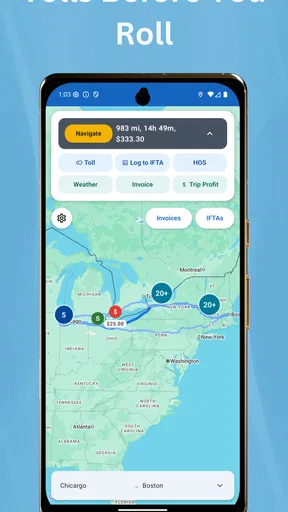
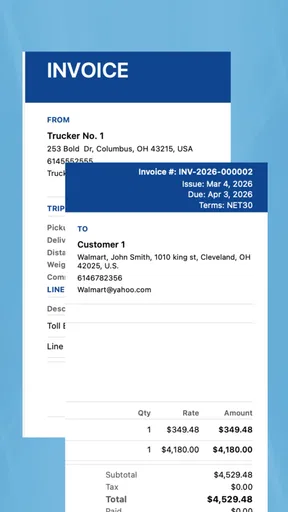
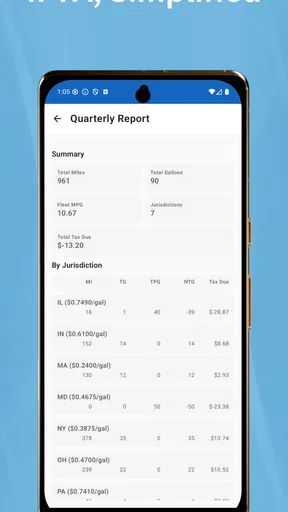
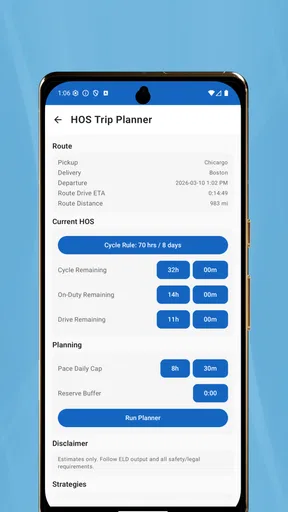
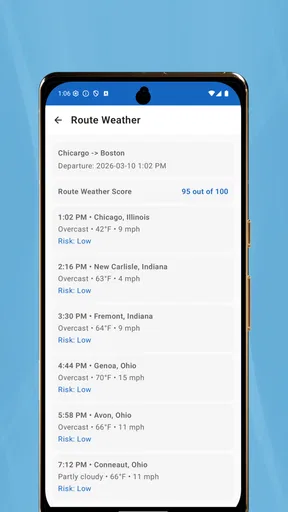
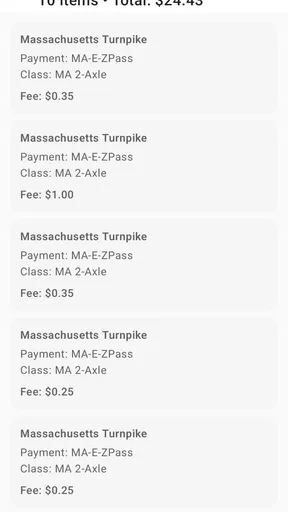
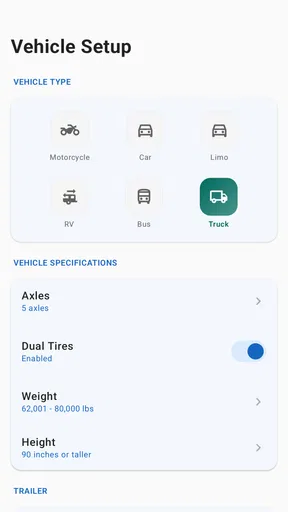
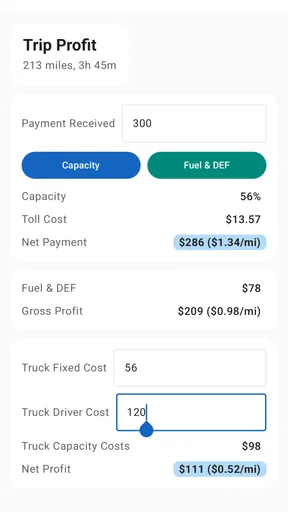
 Analysis by AppCompare
I installed Toll Calculator GPS Navigation expecting a focused way to estimate toll costs, and that is exactly where it makes the most sense. This free Maps & Navigation app from InfoTalk LLC is aimed at people who need more than a simple route line: drivers comparing roads, truck operators checking trip expenses, RV owners planning a long journey, and anyone who wants to think about tolls before reaching the first booth. It is not trying to replace every part of a full navigation suite, and understanding that distinction is important.
My overall impression is practical rather than flashy. The app’s store short description is simply “Toll Calculator,” but its broader positioning also points toward IFTA, trucks, cars, RVs, E-ZPass, SunPass, FasTrak, TxTag, and similar toll-related planning needs. In everyday use, I found the strongest value in preparing for a trip and comparing the financial effect of different routes. I would recommend it to a driver who wants a dedicated toll-planning tool, while someone looking only for turn-by-turn guidance may be happier with a conventional navigation app.
How the app feels in its current state
The current version is 5.5, and the product has been available since November 18, 2016. That history gives it a more established feel than a newly released utility, but it also means the experience is best judged by how efficiently it handles its central job rather than by expecting a modern all-in-one driving platform. I approached it as a cost-planning companion: enter or examine a journey, consider the toll implications, and use that information before committing to a route.
The app is free to download, with optional in-app purchases listed from $9.99 to $34.99 per item. That makes it easy to try without paying at the door, although I would spend time learning which parts of the workflow are available immediately and which may require an upgrade. For a person who only checks tolls occasionally, the free starting point may be enough. For a commercial driver or frequent traveler, the value depends on whether the paid tools save enough time across repeated trips.
Its audience is unusually broad for a toll utility. A passenger-car driver may want a quick estimate for a weekend trip, while a semi driver may care about vehicle classification and operating costs. An RV owner has a different concern again: a route that is reasonable for a car may not be the most suitable choice for a larger vehicle, and the toll total is only one part of the decision. The app’s focus on several vehicle and toll-account contexts makes it more relevant to these cases than a general map that treats every journey as a standard car trip.
The public response is respectable rather than overwhelming, with a 4.0 average from around 790 ratings and about 235 written reviews. I read that as a sign of a useful but specialized product: people who need toll information can find real value in it, while others may not have a reason to keep it installed. It has also passed the 100K-plus install mark, which suggests that the concept reaches beyond a tiny professional niche without making it a universal navigation choice.
What I would use it for first
My preferred workflow would be to check a route before leaving home, not while driving. I would compare the expected toll burden with the extra fuel and time of a non-toll alternative, then save the conclusion in my trip notes or discuss it with the passenger. That small planning step can prevent an unpleasant surprise when a route that looks shorter turns out to be much more expensive than expected.
Worth Reading Before You Choose

EA SPORTS FC Mobile 26 Is a Bigger Football Game, but It Takes Time

Flipboard Shows What News Apps Must Do Beyond the Feed

Switching to Android Auto Means Rethinking Your Driving Routine

Google Calendar Makes a Crowded Week Easier to Manage

Ludo King Makes the Most of the Minutes Between Plans

Baby Panda World Brings Quick Play to Modern Phones, but Its Game Library Feels Busy
A realistic example is a family driving an RV through several toll regions. The driver can use the app to think about the journey as a cost decision instead of blindly following the fastest line on a map. If the toll route saves substantial time, paying may be sensible. If the saving is small, a slower road may be preferable for a relaxed trip. The app does not make that judgment for me; its usefulness is giving me information to make it deliberately.
For a truck operator, the same process becomes more structured. Before dispatch, I would check the planned corridor, note the toll estimate, and place that figure alongside fuel, driver time, and delivery requirements. This is where the IFTA-oriented positioning matters: tolls are not the whole operating picture, but they belong in the same planning conversation. A dedicated calculator can be more useful than relying on memory or a rough figure from a standard route planner.
The practical difference from ordinary navigation apps
Google Maps, Apple Maps, and similar services are usually better when the immediate question is, “How do I get there?” They are designed around live directions, traffic, arrival times, and familiar map interactions. Toll Calculator GPS Navigation is more appealing when the question is, “What will this route cost me, and how should I compare it with another one?” That is a narrower question, but it is also one that broad navigation apps may not present with enough emphasis.
I would not install this app expecting it to become my only driving application. A full navigation platform is generally the better choice for spoken guidance, live traffic decisions, lane-level assistance, and the broader collection of road information people need during a drive. The toll calculator is strongest before departure or alongside another navigation tool. Using both can be sensible: one handles guidance, while this app helps with the financial side of route selection.
That division of labor is one of the app’s most important trade-offs. A specialized tool can make one concern easier to inspect, but it also requires an extra step. If I already have a route open in another application, switching between apps to check tolls may feel inefficient. On the other hand, if toll expenses affect my decision enough to justify a dedicated check, that extra step is worthwhile.
What the version history means for existing users
The confirmed current version, 5.5, is useful context for anyone returning after an older installation. It indicates that the app has continued beyond its original release rather than remaining frozen at its first build. I would still avoid assuming that a newer version automatically means a complete redesign or a perfect match for every current road-planning habit. The meaningful question is whether the present workflow supports the way I travel today.
For existing users, the main benefit of staying current is the chance to use the maintained version instead of relying on an old installation. Toll systems, account names, vehicle categories, and route conditions can change over time, so a toll-focused app needs ongoing attention even when its basic purpose remains the same. I would update before a major journey, then perform a quick test with a familiar route rather than discovering a changed workflow on the morning of departure.
The app supports devices running Android 8.0 or later. That is worth checking before planning around it, especially if the app is being installed on an older phone kept in a vehicle. A spare device can be useful for navigation, but only if it meets the minimum operating-system requirement. I also prefer testing the app on the actual phone I will carry, because a workflow that feels comfortable on a large home screen may be less convenient in a car mount.
Its Everyone content rating makes it suitable for a broad audience from a content-classification perspective. That does not mean every driver should use it while moving. I would enter destinations, compare routes, and review toll information before starting, then leave active driving tasks to a passenger or stop safely. A toll estimate is not worth creating a distraction, particularly when the app is being used as a planning tool rather than a complete hands-free navigation system.
Three workflows that reveal its real value
First, I would use it as a pre-trip budget check. Instead of asking only whether a route is faster, I would compare the toll amount with fuel consumption and the value of saved time. This is especially useful when traveling with several people, because the cheapest route is not always the best route, and the fastest route is not always the most comfortable. The app gives the toll component a visible place in that decision.
Second, I would use it before a vehicle change. A route planned for a normal car should not automatically be treated as equivalent for a truck or RV. Vehicle type can affect how a driver thinks about tolls and road suitability, so I would recheck the journey whenever the vehicle changes. This is a small habit, but it avoids carrying assumptions from a passenger car into a larger or commercial vehicle.
Third, I would use it as a record-building aid for repeated travel. A contractor, delivery driver, or frequent traveler can check the same corridor at different times and keep personal notes about the result, the route chosen, and the actual toll experience. The app itself should not be treated as a substitute for accounting records, but using it consistently can improve estimates for future planning. The important insight is that its benefit grows when toll checking becomes a repeatable routine rather than a one-off lookup.
There is also a useful trade-off involving toll transponders and regional systems. The references to E-ZPass, SunPass, FasTrak, and TxTag make the app relevant to drivers who already think in terms of electronic toll networks. However, I would still verify the final charge through the appropriate account or toll authority when the exact amount matters. A planning estimate is helpful for comparing routes, but commercial reimbursement, billing disputes, and official expense reporting deserve primary-source confirmation.
Where the experience may create friction
The biggest limitation is scope. If I want one application to handle traffic, voice directions, parking, fuel stops, road closures, and toll accounting in one continuous experience, this is probably not the right choice. Its specialization is an advantage only when toll planning is important enough to deserve separate attention. For an occasional city driver who rarely encounters toll roads, installing a second navigation app may add more complexity than value.
The purchase structure is another point to examine carefully. The app is free, but individual in-app purchases range from $9.99 to $34.99. I would not assume that every advanced need is included in the free experience, and I would decide based on actual travel frequency rather than buying immediately. A professional user may justify the expense if it supports regular route planning, while a family taking one long trip may prefer to test the basic workflow first.
I also see a potential accuracy-management issue common to toll tools: the result is only as useful as the assumptions behind it. Vehicle type, toll-road choice, account system, and route variation can all affect what a driver ultimately pays. I would treat the displayed figure as a planning aid, not as an invoice. For an important delivery or a tightly controlled travel budget, I would compare the app’s result with the relevant toll authority before finalizing the estimate.
Another limitation is that the app’s name can create expectations beyond its central function. “GPS Navigation” sounds like a complete guidance product, but my recommendation is based primarily on its toll-calculation role. I would pair it with a familiar navigation service if I needed dependable live directions. That pairing is not a failure; it is simply a clearer way to use a specialized app without asking it to replace tools built for different jobs.
Who should install it and what I would watch next
I would suggest this app to truck drivers, RV travelers, road-trip planners, and anyone whose route choice is strongly affected by toll expense. It is also worth considering for households that regularly travel across toll regions and want a quick way to discuss cost before leaving. The free entry point makes experimentation easy, and the broad vehicle-oriented focus gives it more practical relevance than a generic distance calculator.
I would skip it if I almost never use toll roads, if I need a single app for live turn-by-turn driving, or if I am unwilling to verify estimates for business-critical expenses. A standard navigation app may be more convenient for simple journeys. Likewise, a toll authority’s own information may be preferable when I need an official charge, account-specific detail, or confirmation for reimbursement.
For new users, I recommend starting with a familiar route whose toll outcome is already known. Check how the app presents the journey, compare the result with your own records, and only then use it for an unfamiliar long-distance trip. Next, repeat the check with the vehicle you actually drive. That test can expose misunderstandings about car, truck, or RV planning before they affect a real departure.
Existing users should watch how version 5.5 fits into their current routine rather than focusing only on the version number. I would pay attention to whether route comparisons are quick enough, whether the relevant toll network is easy to identify, and whether the paid options provide a meaningful improvement for repeated work. Those are more useful questions than simply asking whether the app has been updated.
What I would watch going forward is continued support for the changing toll landscape and a smoother relationship with full navigation tools. Better clarity around vehicle assumptions, route alternatives, and the boundary between an estimate and an official charge would make a specialized product easier to trust. I would also value a workflow that lets me plan in advance without encouraging phone interaction once the vehicle is moving.
After using it, I see Toll Calculator GPS Navigation as a focused companion rather than a universal driving solution. InfoTalk LLC has built its identity around a problem that ordinary map apps do not always foreground: understanding the toll cost of getting from one place to another. The 4.0 average and 100K-plus installs show that the idea has found a real audience, while the specialized nature of the app explains why it will not suit everyone.
My recommendation is straightforward: install it if tolls affect your route or operating budget, test the free experience on a known journey, and use the result as one part of a wider travel decision. I would keep a full navigation app available for live guidance and confirm important charges through official sources. Used with those expectations, this free app can turn toll planning from a last-minute guess into a practical step before the engine starts.
Pros
- Calculates toll costs before departure for easier travel budgeting.
- GPS navigation helps compare routes with different toll expenses.
- Useful for road trips
- commuting
- and unfamiliar highways.
- Can reduce surprises by highlighting toll roads along the route.
- Simple planning tool for drivers who want to control travel costs.
Cons
- Toll prices may be outdated or vary by vehicle type and payment method.
- Coverage and accuracy can differ between countries and regions.
- Some features may require an internet connection or location access.
- Traffic conditions and temporary road closures may not update instantly.
- Route suggestions may prioritize toll savings over the fastest journey.
FAQs for Toll Calculator GPS Navigation
What is Toll Calculator GPS Navigation, and how does it work?
Toll Calculator GPS Navigation is a travel and route-planning app designed to help drivers compare journeys that include toll roads. After entering a destination, the app can provide navigation guidance while estimating toll expenses along available routes. It is useful for commuters, road-trip travelers, and professional drivers who want to consider both driving time and expected road charges before starting a trip.
Are the toll prices and route calculations always accurate?
The app’s estimates are helpful for planning, but they should not be treated as guaranteed final prices. Toll fees may change because of updated tariffs, vehicle type, payment method, time of travel, discounts, or local regulations. Road closures and traffic conditions can also affect the suggested route. It is a good idea to verify important toll information with the relevant road authority.
Does Toll Calculator GPS Navigation work without an internet connection?
Offline availability may depend on the app version, downloaded map data, and the specific navigation features being used. Live traffic updates, current road conditions, online toll databases, and some route searches generally require an internet connection. Before traveling through areas with weak coverage, users should check whether maps can be saved offline and prepare an alternative route in advance.
Can the app calculate tolls for different types of vehicles?
Toll charges often vary according to vehicle category, including cars, motorcycles, vans, trucks, trailers, and vehicles with different axle counts. If the app provides vehicle settings, entering the correct category is essential for receiving a more realistic estimate. Users should review these options carefully, because selecting the wrong vehicle type can produce an inaccurate toll total and lead to unexpected travel costs.
Is Toll Calculator GPS Navigation free to download and use?
The app may be available to download at no initial cost, but some features can depend on the developer’s current pricing model. Navigation tools, advertising, premium route options, offline maps, or advanced toll information may be restricted by in-app purchases or subscriptions. Before downloading, users should check the official store listing for the latest details about prices, permissions, supported devices, and optional paid features.


